Internet Tip - How to prevent Spyware, Adware & Viruses

Subscribe to Internet Tips and Tools Feed
Quick Jump

Web Browsing

In Email

Links
Home Page

If you are ever infected with adware or spyware your computer may run very slowly and you may get alot of annoying pop-up advertisements. It can also be very difficult to remove most spyware/adware. It is even more difficult to remove viruses. The key is prevention. There are steps you can take so as to not get spyware, adware, or virus infections on your computer.

Even after a professional computer technician has removed adware, spyware or viruses from you computer you can EASILY become infected again if you are not careful. So follow these steps to make sure you are not infected again. I do NOT recommend that you attempt to remove adware or spyware by yourself. If your home page has been changed, your computer is running slowly, or you are having other problems then contact a professional computer technician to have them remove the infections.

So far there are no effective programs to install to protect against spyware infections. The adware/spyware detection in antivirus programs just slow down the computer and offer very minimal protection.

Follow these easy steps to prevent infection:

While Web Browsing

  • Supervise every person that uses your computer including young ones and relatives. Youths are notorious for going to web sites they should not go to and clicking on things they should not click on. Also NEVER leave relatives unattended on your computer. I have repaired many computers after someone let a close relative use it.
  • NEVER click anywhere on pop-ups. If you click anywhere on a

    pop-up ad

    you will probably get infected. Some pop-ups will have a question with a "YES" or "NO" or "CANCEL" button. Sometimes even when you click on "NO" or "CANCEL" they will install a piece of spyware in your computer. So never click on the buttons. Only click on the closing "X" to remove the pop-up. However, beware of fake closing "X"'s. These appear below the real closing "X". If you get pop-ups from a certain website never go to that website again.

    Picture examples:

    [+]

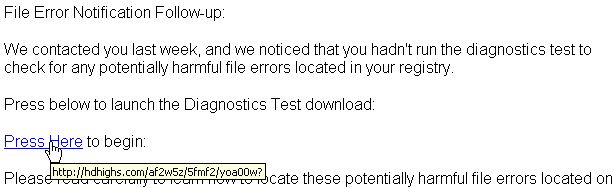
  • Beware of pop-ups or web pages that tell you your computer may be infected, or that they can help your computer to run faster. NEVER click on these or you will become infected with adware.

    Picture examples:

    [+]

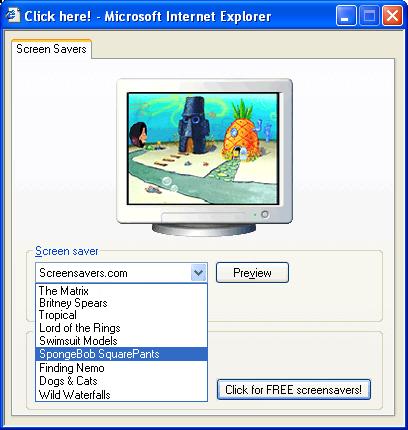
  • Do not download free screensavers or smiley faces. These free programs usually come with adware/spyware hidden in them.

    For picture examples click the plus.

    [+]

  • Never visit porn or adult sites. Websites that show XXX pictures are full of adware and spyware. By just visiting these sites you will probably infect your computer.
  • Never visit sites that offer commercial software for you to download and use illegally. Warez sites and other sites that offer commercial software for free are full of adware and spyware. Also the version of the software that you download is usually embedded with a virus.
  • Never visit game cheat sites, game hint sites, or software crack sites. Most of these type of sites are full of ways to infect your computer with adware.
  • Do NOT use file or music sharing software such as Kazaa. Most file sharing software is embedded with adware/spyware. Many times the software will CLAIM it has no adware, but that CLAIM is sometimes false. Also it is very easy to download a program or a music file that someone is sharing and get infected with spyware or a virus that could destroy your data.
  • Many free downloadable games come with adware. Before downloading a game look for user reviews to see if it contains adware or spyware.

Prevent Adware/Spyware in Email

  • Never open emails that contain attachments or look suspicious. Trojan and virus makers are always finding ways to bypass security in email applications. They can often figure out a way to infect your computer just by you reading the email. So if the email looks suspicious just delete it, do not open it. Even if the email comes from someone you know, if it contains an attachment or you were not expecting it do NOT open it. Your friend could be infected with a virus and that virus can send an email to you under your friend's email address without your friend even knowing of it. When you read the email or download the attachment you then get a virus.
  • Do not open attachments in emails. Period! If you want to be sure not to get a virus or a trojan on your computer NEVER open an attachment even if it comes from a friend. If they are unknowingly infected with a virus they could be infecting you with whatever it is they are trying to share with you. Tell your friend to not send you attachments but to paste whatever it is they are trying to share with you directly into the body of the email. Or your friend can upload a picture to a picture sharing site and you can view it there.
  • Never click on a picture in an email. Images in emails can be setup to download a virus into your computer. So never click on a picture. Sometimes text in an email is actually a picture of the text. Beware, do not click on text that is actually a picture.
  • Never click on web links in an email. Spammers can make it look like a web link is going to a legitimate website whereas in actuallity they are sending you to a site that can infect you with a virus or it may be a site phishing for your login ID and password or account numbers.

    Emails that claim they have a program that will remove viruses or that can fix windows problems are almost always scams and you should never open or click on pictures or links in such emails.

    Examples:

    [+]

Web Mail Tip (gmail, yahoo, hotmail)

Web mail is email that you read in your browser by going to a web mail site such as gmail.com. Sometimes you can see where a link is actually sending you in web mail by putting your mouse cursor over the link and then looking at the bottom bar of your browser window which is called the Status Bar. But beware that some criminals have figured out how to change the address displayed in the status bar. You can also right-click on a link in web mail and then left-click on Properties. This might show you the actual address where a link is sending you. Again beware that some criminals may have figured out how to change this address listing also.

AOL Mail Tip

In America Online you may be able to see where a link in an email is actually going to lead you by leaving your mouse cursor over a link for a few seconds. A small tag should pop-up and display the actual link adress. However, keep in mind that some criminals may know how to display a fake address there also.

For a picture example click on the plus:

[+]

Outlook Tips

  1. In Outlook, if outlook is automatically displaying a preview of an email before you open it then turn the preview off! Programmers can put code into an email that when it is previewed or read it can infect your computer with a virus or possibly with spyware. Most emails you just don't want to view in Outlook because virus makers know how to have Outlook execute commands that can be dangerous. To turn off the preview pane click on View -> Preview Pane.
  2. However, there is a gripe I have with many versions of Outlook. When you double click on an email to read it there is no longer a Status Bar at the bottom of the new window. So with no Status bar you cannot see where a web link might be going. My personal recommendation is still to never click on web links and never to have the Preview Pane on in Outlook. However, if you want to see where a web link is going and the status bar does not display when you double click on an email then you may want to turn on the Preview Pane just for a few seconds so that you can see where a web link might be going by putting your mouse cursor over the link and looking at the satus bar. This works because the main window in Outlook has a status bar.

Back to www.seabreezecomputers.com
Subscribe to Internet Tips Feed

View Comments

User Comments

There are 4 comments.

Displaying first 5 comments.

1. Posted By: cpstar - - February 9, 2007, 2:21 pm
Good summary. Thanks for the examples.

2. Posted By: Jeff - - March 18, 2007, 9:12 pm
hi

3. Posted By: Anonymous - - November 20, 2007, 3:55 pm
These are my rules to live by.

4. Posted By: BEXXXXXXX - - April 14, 2008, 8:27 am
hi